Key Takeaways:
- Symbolic regression outputs explicit formulas, not black-box predictions
- TuringBot runs locally with zero dependencies—download, double-click, done
- Automatically selects relevant features (variables that don't matter won't appear in formula)
- Formulas can be deployed anywhere: Excel, SQL, embedded systems, any language
When to Use Symbolic Regression
| Use Case | Why Formulas Help |
|---|---|
| Scientific research | Discover governing equations from experimental data |
| Finance / Insurance | Regulatory-compliant explainable models |
| Embedded systems | Deploy single equation on microcontrollers |
| Feature selection | Formula shows which variables actually matter |
TuringBot vs. Python Libraries
| Feature | TuringBot | PySR / gplearn |
|---|---|---|
| Installation | Simple installer | pip + dependencies (Julia for PySR) |
| Interface | GUI + command line | Code only |
| Performance | Compiled C++ | Interpreted / JIT |
| Cross-validation | Built-in with visual feedback | Manual setup |
How It Works
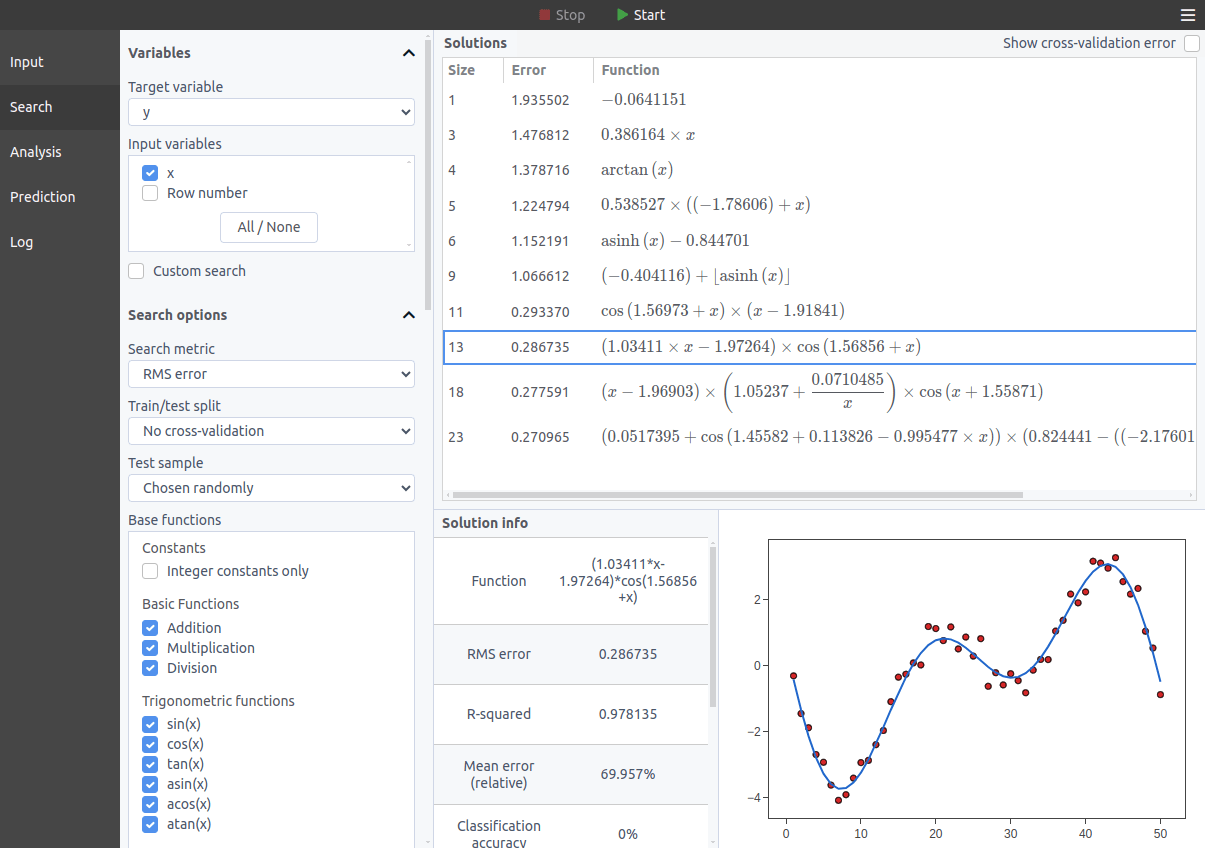
Load a CSV/TXT file → select target variable → click Start. TuringBot tests thousands of formula combinations per second and displays the Pareto front of solutions (accuracy vs. complexity).
Get Started
Download TuringBot for Windows, macOS, or Linux. Free version available—no Python or environment setup needed.