If you came to DataRobot for symbolic regression, there is a desktop alternative called TuringBot. This page covers what it does and how the two differ.
TuringBot vs DataRobot
DataRobot is a web-based AI service. Since the company acquired Eureqa, it started offering the possibility of creating symbolic regression models.
TuringBot is desktop software for symbolic regression that runs on Windows, macOS and Linux. So, contrary to DataRobot, it is not a cloud service.
This is what its interface looks like:
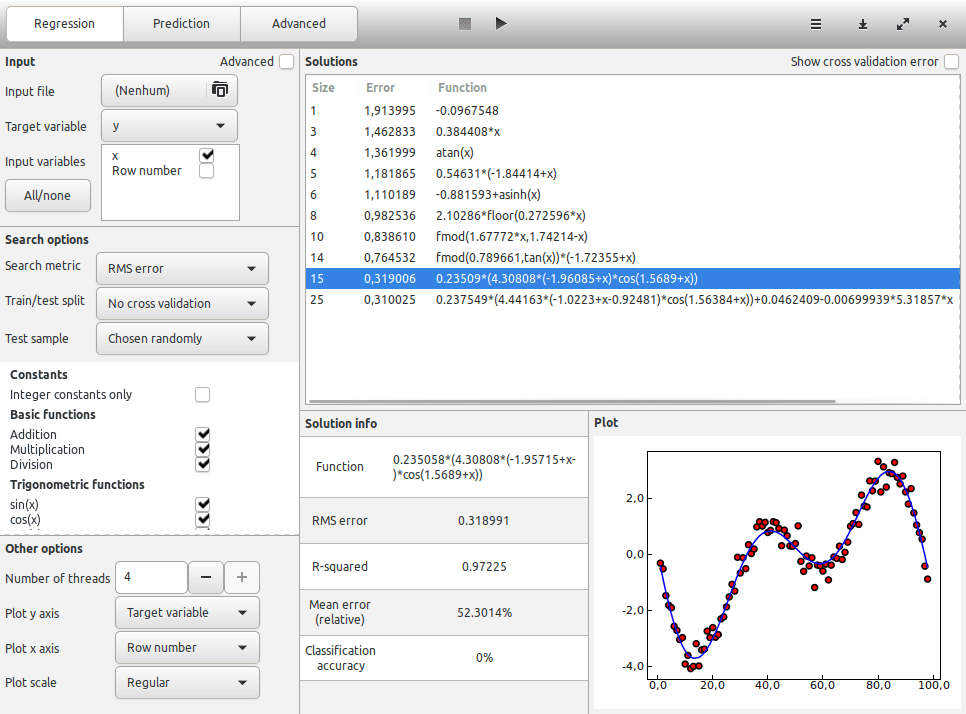
The program takes as input data in .TXT or .CSV format. What it does is discover explicit mathematical formulas that connect a target column of your dataset to the remaining columns.
While the optimization is running, the best formulas found so far will appear in the Solutions box, ordered by size.
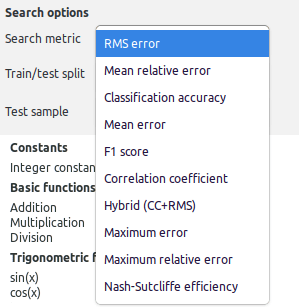
A number of error metrics are available for the search. This allows the program to model a wide variety of problems:
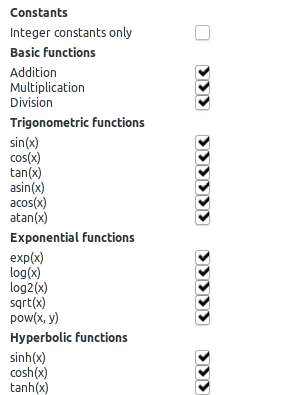
The base functions are divided into the categories Basic, Trigonometric, Exponential, Hyperbolic, Logical, Lag, and Other.
Custom searches
The program includes an Advanced mode that allows you to define custom searches:
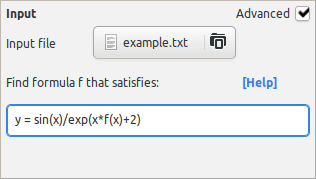
In this mode, you can type an equation and find formulas f that satisfy this relationship. The equation can include:
- Your variables
- Numerical constants
- The base functions offered by the program
This mode is useful for implicit symbolic regression problems, and also to speed up your search if you have some previous knowledge on what your desired formula should look like.
Command line usage
TuringBot is also a command-line application that comes with a Python library. Execution in Python is quite simple:
sim = tb.simulation()
sim.start_process(path, input_file, threads=4, config=config_file)

sleep(10)
sim.refresh_functions()
print(*sim.functions, sep='\n')
The output will look like this:
[1, 177813.0, '186276']
[3, 7890.39, '11.7503*x']
[5, 6895.25, '11.9394*(-472.86+x)']
[7, 980.126, 'lgamma(1.22707*x)']
[8, 673.221, 'lgamma(x)+2.3807*x']
[9, 240.166, '1.06211*x*acosh(x)']
[11, 122.991, 'asinh(-488.38+x)*1.06368*x']
[13, 101.933, '(acosh(x)-0.177895)*(1.08025*(-22.5364+x))']
[15, 97.7944, '65.1453+((asinh(x)-0.176956)*(1.08025*(-30.9+x)))']
The search is fully customizable, and the syntax is detailed in the documentation.
Pricing
The pricing model of TuringBot is simple and much cheaper than DataRobot’s. Two options are available:
- Yearly subscription
- Lifetime license
Both options include free updates of the program. Their prices can be consulted on our Pricing page.
Get TuringBot
In conclusion, TuringBot is a DataRobot alternative that offers an easier and more accessible way of performing Symbolic Regression.
The program is particularly useful for researchers and engineers looking to turn their data into mathematical formulas, and who want a tool that is cheaper and easier to use than DataRobot’s web-based AutoML.
You can download the program from our website.