Key Takeaways:
- TuringBot is a free desktop AI software—no cloud, no subscription required
- Solves regression, classification, and rare event detection problems
- Outputs interpretable formulas, not black-box neural network weights
- Standalone binary—no Python/R installation needed
TuringBot vs. Cloud AI Platforms
| Feature | TuringBot | Cloud AutoML Services |
|---|---|---|
| Data privacy | Runs locally—data never leaves PC | Data uploaded to cloud |
| Cost | Free version available | Pay-per-use |
| Output | Human-readable formulas | Black-box API |
| Internet required | No | Yes |
The Interface
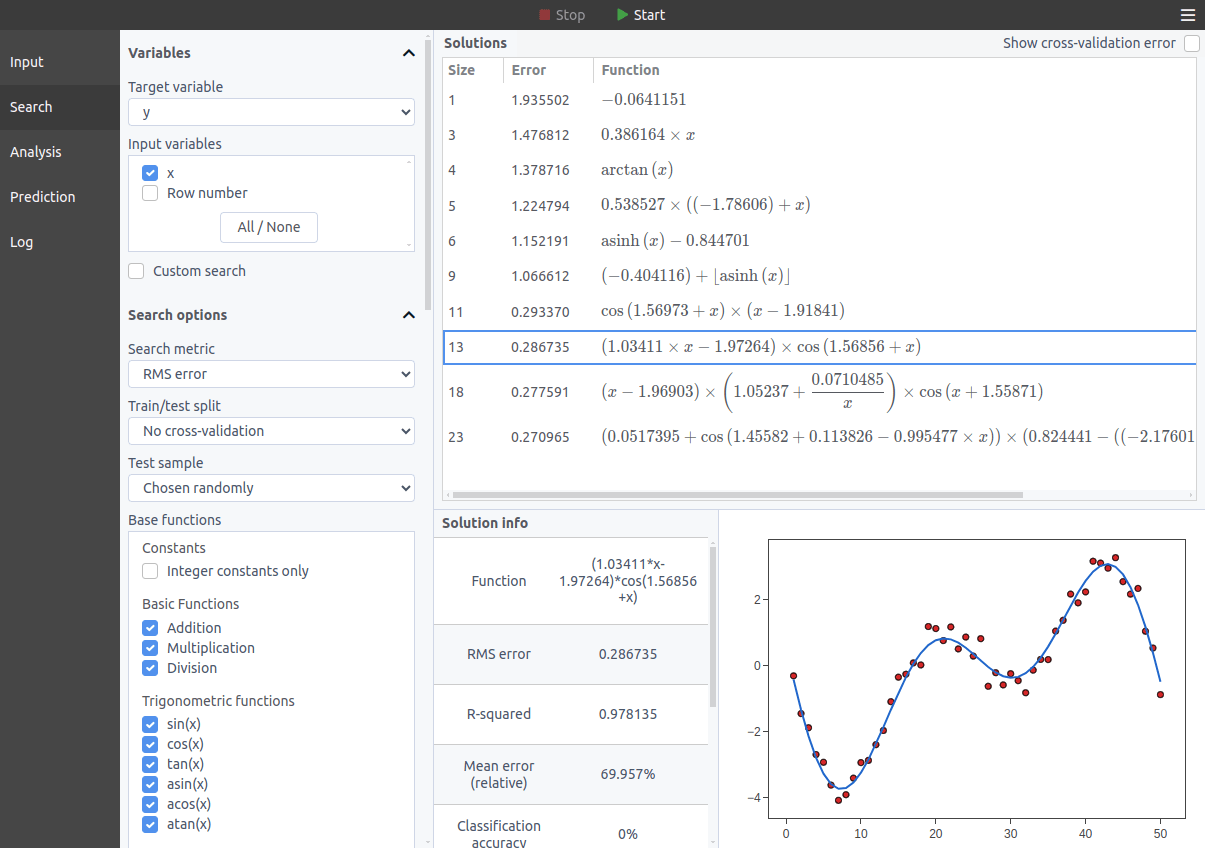
Load CSV/TXT data → select target column → click Start. TuringBot discovers formulas automatically.
The problems that it can solve
Some examples of problems that can be solved by the program are the following:
- Regression problems, in which a continuous target variable should be predicted. See here a tutorial in which we use the program to recover a mathematical formula without previous knowledge of what that formula was.
- Classification problems, in which the goal is to classify inputs into two or more different categories. The rationale of solving this kind of problem using symbolic regression is to represent different categorical variables as different integer numbers and run the optimization with "classification accuracy" as the search metric (this can easily be selected through the interface).
- Classification of rare events, in which a classification task must be solved on highly imbalanced datasets. The logic is similar to that of a regular classification problem, but in this case, a special metric called F1 score should be used (also available in TuringBot).
Getting TuringBot
If you liked the concept of TuringBot, you can download it for free from the official website. There you can also find the official documentation, with more information about the available search metrics, the input file formats, and the various features that the program offers.